How to Check if a Prop Firm Allows Your EA
By Tomas Rieder
Before switching on an Expert Advisor on a prop firm challenge, you need to verify three layers: the firm's explicit EA policy, whether your EA's performance fits the firm's drawdown and consistency rules, and whether the EA will execute reliably on the firm's platform and server infrastructure. A single mismatch can disqualify your account. An EA that breaches the daily drawdown limit, trades outside permitted hours, or performs differently due to latency ends your challenge. This guide walks you through the confirmation steps you need before going live.
Key takeaways: What to verify before EA activation
- Confirm the prop firm explicitly allows EAs in writing. Most firms allow them but with specific restrictions.
- Compare your EA's historical maximum daily and overall drawdown against the firm's hard limits, with a safety buffer of at least 10-15%.
- Test your EA on a demo account under the exact same trading conditions: server location, broker spreads, commissions.
- Verify the EA respects lot size caps, trading hour restrictions, and news-trading blackouts spelled out in the firm's rules.
- Ensure platform compatibility. MetaTrader 4 EAs run on MT4 only; MT5 EAs on MT5.
- Run the EA on a Virtual Private Server located close to the prop firm's server to minimize latency and execution slippage.
What it means: Expert Advisors in prop firm challenges
An Expert Advisor is an automated trading program that executes trades based on predefined rules. It removes manual entry and exit decisions from the equation.
A prop firm challenge is a simulated trading account that evaluates your trading skill; success typically unlocks a funded live account. The question isn't whether to use an EA, it's whether the EA you want to run complies with the firm's ruleset and will perform as tested when deployed on their infrastructure.
Key terms you'll encounter:
Maximum Daily Drawdown: The largest percentage loss an account can suffer from its starting balance on any single trading day.
Maximum Overall Drawdown: The largest percentage loss from the account's initial balance throughout the entire challenge period.
Consistency Rule: A requirement that profits come across multiple trading days or weeks, preventing a single lucky trade from passing the challenge.
Lot Size Restrictions: Caps on the maximum number of lots per position or per trading day.
Latency: The delay between an EA's signal and execution on the trading server. Higher latency degrades fill quality.
Slippage: The difference between the expected entry/exit price and the actual fill price.
Why it matters: Rule breaches end accounts fast
Running an EA that violates a single firm rule will result in immediate challenge failure or account closure, regardless of whether the EA is profitable.
A research comparison based on verified public rules and official pricing pages shows that many EAs, when applied to varying drawdown limits without adjustment, can breach those limits in simulated environments within 30 days when tested against standard prop firm parameters. The risk isn't just financial loss; it's disqualification. Many traders skip the verification step, assume their EA will work, and lose their challenge fee without ever reaching the funded account stage.
An EA that performed well on your local backtesting environment may execute differently on the prop firm's server due to latency, spread differences, or liquidity variations. Academic work on algorithmic trading highlights latency as a critical factor in execution quality; even small delays can compound into missed entries or wider-than-expected slippage, particularly for strategies sensitive to price timing.
How it works: The five-step verification process
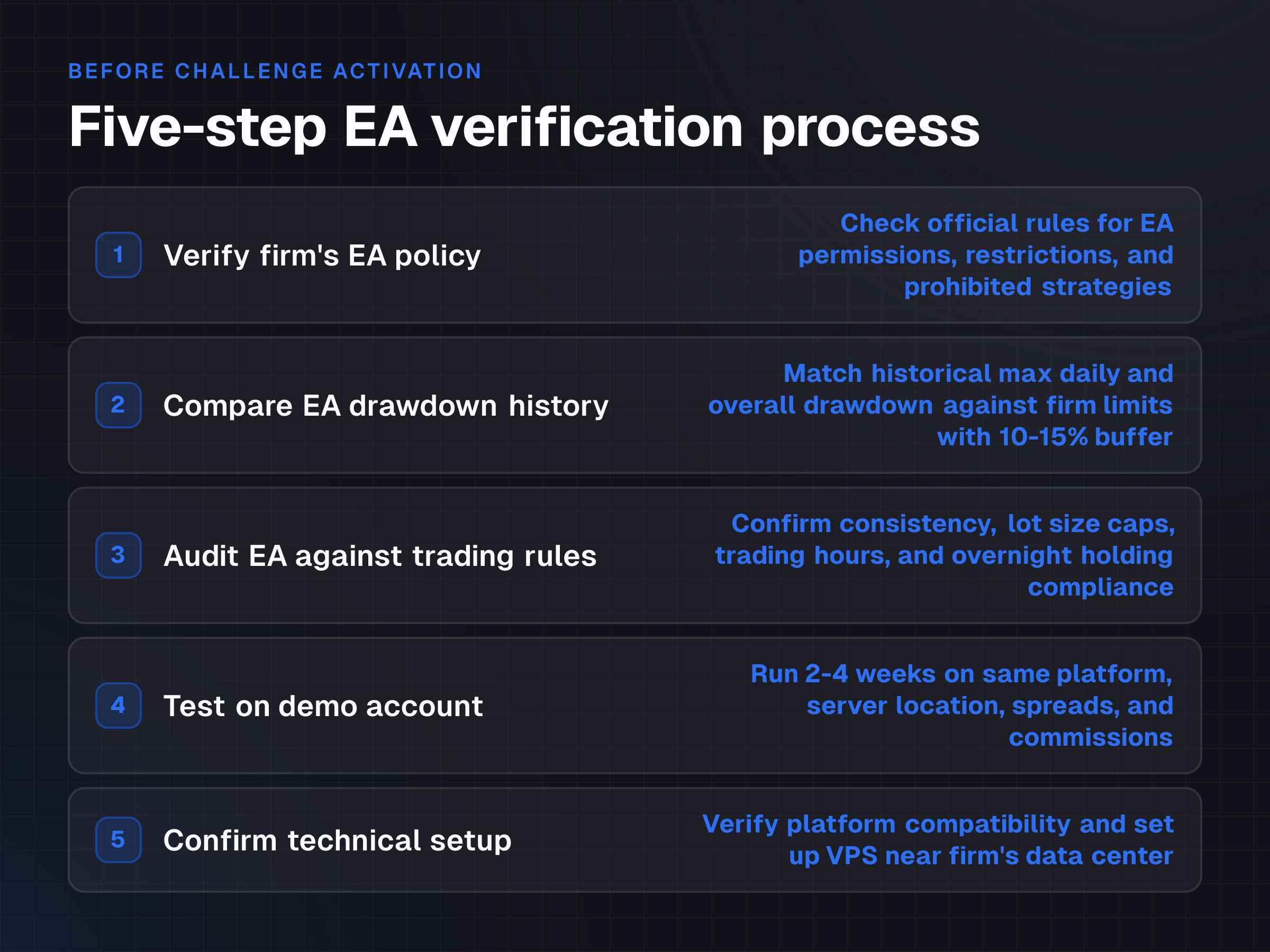
Step 1: Verify the firm's EA policy in writing
Begin by checking the prop firm's official rules, FAQ, and support documentation. Look for explicit statements on:
- Does the firm allow EAs at all?
- Are certain EA types prohibited (arbitrage, high-frequency trading, tick scalping)?
- Are there restrictions on news trading or overnight holding specific to automated strategies?
- Must the EA trade in a "manual-like" manner, meaning consistent lot sizes and logical time gaps between trades?
Don't assume. Some firms allow EAs freely; others restrict them heavily or ban them outright. How to check a firm really allows Expert Advisors provides a detailed framework for this verification.
Step 2: Compare EA drawdown history against firm limits
Obtain your EA's backtesting and live trading statistics, if available. Focus on:
Maximum Daily Drawdown: What's the largest single-day loss the EA has ever recorded? Compare this against the firm's maximum daily drawdown cap. Your EA should consistently stay below the limit with at least a 10-15% buffer.
Maximum Overall Drawdown: What's the deepest peak-to-trough loss across the entire backtest period?
This should sit comfortably below the firm's overall drawdown threshold. If the EA's historical drawdown is 8% and the firm permits a 10% daily drawdown, you're operating with only a 2% margin. A slightly different market regime or a volatile day could exceed the limit. A safer approach is to ensure the EA historically runs at 5-6% or lower against a 10% cap.
Step 3: Audit the EA against trading rules
Prop firms publish specific rules. Match your EA to each one.
Consistency Rule: Analyze whether the EA generates steady profits across multiple trades and days, or if it relies on a few large winning trades. Firms often penalize inconsistent performance. A profitable EA that wins on 4 days out of 20 trading days may fail a consistency check even if the total P&L is positive.
Lot Size Restrictions: Check the firm's maximum lot size per position and per account. Verify that the EA's position-sizing logic adheres to these caps. If the firm permits a maximum of 5 lots per trade and your EA opens 10-lot positions, you'll breach the rule immediately.
Trading Hours and News Restrictions: Many firms prohibit trading during specific windows: overnight, pre-market, during major economic announcements. Confirm your EA doesn't trade outside permitted hours. If it does, either disable it manually during restricted times or reprogram the EA's internal logic to respect the blackout windows.
Overnight Holding: Some firms cap overnight positions or forbid them entirely. Verify your EA closes all trades before the daily cutoff if required. Overnight Holding: What Breaches an Account details how this rule works in practice.
Step 4: Test on a demo account under real conditions
Run the EA on a demo account that mirrors the prop firm's trading environment as closely as possible.
Key criteria:
Same Trading Platform: If the firm uses MetaTrader 4, test on MT4. If MT5, use MT5. Platform-specific features and EA behavior differ.
Same Server Location: Request a demo from a broker with servers in the same geographic region as the prop firm. This mimics latency.
Same Spreads and Commissions: Use a broker with similar bid-ask spreads and commission structures to the prop firm. Small differences (0.5 pip spread vs. 1.5 pip) erode profitability over hundreds of trades.
Adequate Duration: Run the EA for at least 2-4 weeks in real-time to observe its behavior across varying market conditions, not just a few days.
Monitor the EA's actual trade execution: entry and exit prices, slippage, and whether trades fill at the expected levels. This forward-testing phase catches issues that backtesting cannot.
Step 5: Confirm technical setup and infrastructure
Platform Compatibility: MetaTrader 4 EAs are not portable to MetaTrader 5 without recoding. Confirm your EA is compiled for the exact platform the prop firm uses.
VPS Setup: Running an EA requires the trading platform to be online 24/7. Your local computer can't be shut down. Rent a Virtual Private Server located geographically close to the prop firm's data center. This minimizes latency and ensures uninterrupted operation. A few milliseconds of delay can mean the difference between a fill at your target price and a miss.
Example or scenario: A trader's pre-launch checklist
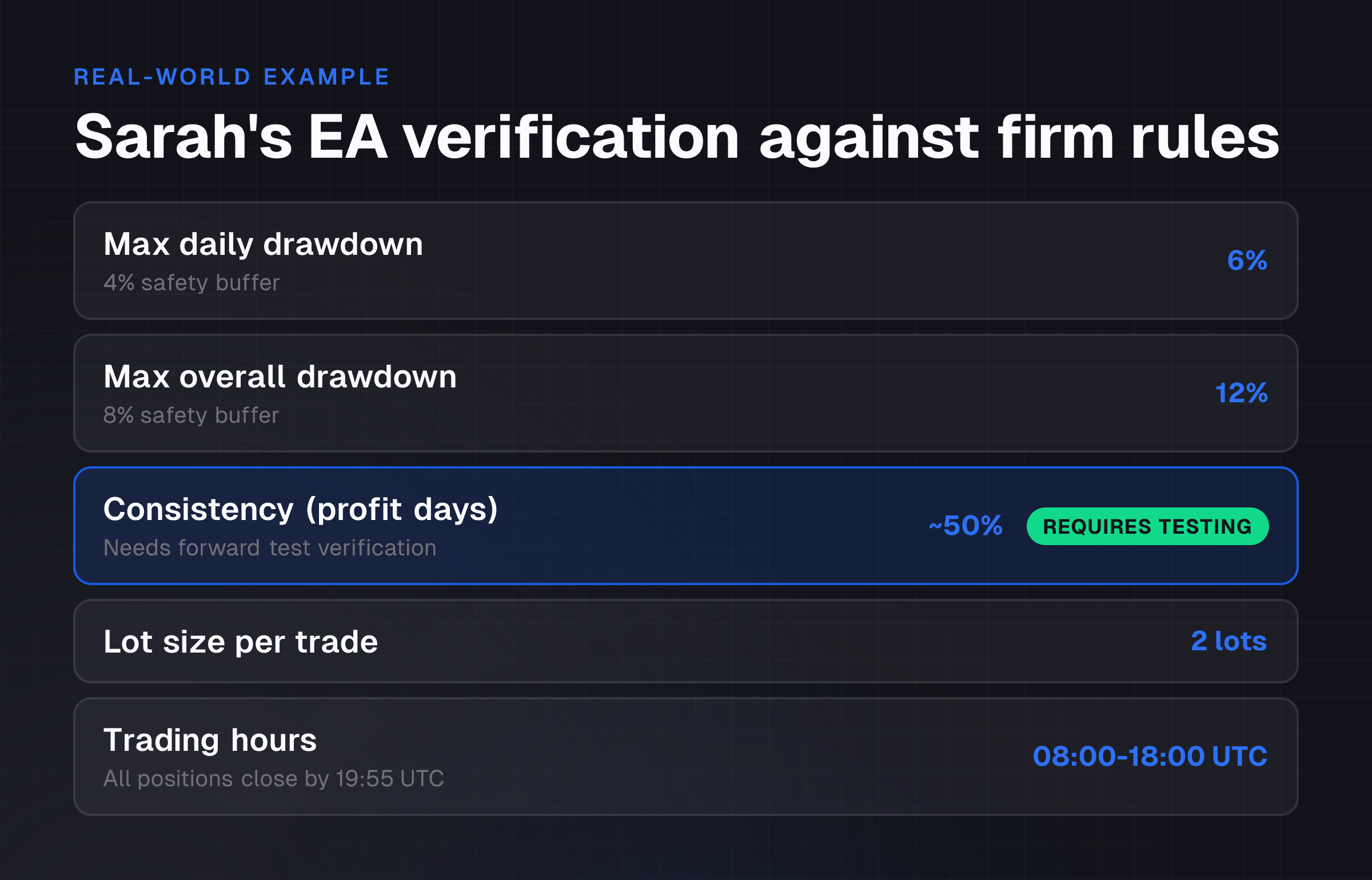
Sarah has developed an EA that she backtested on EUR/USD over 12 months of historical data. The backtest shows:
- Maximum daily drawdown: 6%
- Maximum overall drawdown: 12%
- Average trade profit: $120
- Win rate: 52%
- Average holding time: 4 hours
She applies to a prop firm challenge with these rules:
- Maximum daily drawdown: 10%
- Maximum overall drawdown: 20%
- Consistency rule: Must show profit on at least 60% of trading days
- Lot size cap: 5 lots per trade
- No overnight holding (all positions close by 20:00 UTC)
- Trading hours: 08:00-20:00 UTC only
Before activating her EA on the challenge, Sarah:
-
Confirms the firm's EA policy in writing. The FAQ states EAs are allowed, provided they trade in a "discretionary manner" (i.e., not scalping every tick or using arbitrage). Sarah's 4-hour holding strategy qualifies.
-
Compares drawdown limits. Her EA's 6% max daily drawdown is below the 10% cap with a 4% buffer. Her 12% overall drawdown is well below the 20% cap. ✓
-
Audits the consistency rule. Her 52% win rate across 12 months suggests she'll profit on roughly 50% of days. This is borderline against a 60% threshold. She decides to run a 1-month forward test on a demo to verify this holds in live markets.
-
Tests lot sizing. The firm caps at 5 lots per trade. Sarah's EA uses a fixed 2-lot position size, so this is safe. ✓
-
Checks trading hours. Her EA trades 08:00-18:00 UTC on average. The firm allows 08:00-20:00 UTC, so she's compliant. She also manually verifies that the EA closes all open trades by 19:55 UTC, well before the 20:00 cutoff. ✓
-
Tests on a demo MT4 account with the same broker the prop firm uses. She runs the EA for 3 weeks and observes that the average slippage is 0.3 pips, consistent with her backtest assumptions. ✓
-
Books a VPS in the same data center region as the prop firm. ✓
Sarah is now confident she can activate the EA on the challenge without rule violations.
Common mistakes or risks: What derails EA traders
Overlooking the consistency rule. A profitable EA that makes 3 large wins on days 5, 12, and 20 may fail the challenge even if total profit is high, because it didn't profit on 60%+ of trading days. Review your EA's trade distribution, not just total P&L.
Ignoring latency and slippage differences. An EA backtested on your home broker with tight spreads will perform differently on the prop firm's platform if latency or spreads are wider. Forward-testing on a demo is non-negotiable.
Assuming platform compatibility. MetaTrader 4 and MetaTrader 5 handle orders, data feeds, and EA functions differently. An EA compiled for MT4 won't run on MT5. Verify the exact platform before deploying.
Over-optimization. An EA tuned to perfection on historical data (curve-fitting) often fails when market conditions shift. Test on out-of-sample data or a live demo to catch this.
Not reading all firm rules. Prop firms publish detailed rulebooks. Missing a single rule, whether it's a news-trading blackout, overnight holding restriction, or lot size cap, can end your account. Read the entire rulebook, not just the highlight reel on the homepage.
Running without a VPS or on an unreliable connection. If your EA loses connection to the trading server or your computer crashes, open trades may be liquidated or closed at unfavorable prices. A dedicated, geographically close VPS eliminates this risk.
Trusting vendor claims without verification. EA developers market high win rates and returns. Independently backtest and forward-test any EA before using real capital. Expert Advisors: the rules that get accounts breached details common EA failure modes.
How to choose or what to do next: Your launch sequence
-
Retrieve the prop firm's EA policy and full rulebook. Save both as reference documents.
-
Collect your EA's performance data. Export backtesting results with at least 12 months of historical data at 99% modeling quality (as emphasized in MetaTrader documentation on backtesting standards) and any live forward-testing results if available.
-
Run a side-by-side comparison. Create a simple table:
- EA's max daily drawdown vs. firm's daily limit
- EA's max overall drawdown vs. firm's overall limit
- EA's win rate vs. firm's consistency threshold
- EA's lot sizing vs. firm's lot cap
- EA's trading hours vs. firm's permitted hours
If any cell shows the EA exceeds the firm's limit, either adjust the EA's settings or don't proceed.
-
Set up a demo account. Use the same broker or platform the prop firm uses, if possible. If not available, choose a broker with similar spreads and commission structures.
-
Run the EA on the demo for 2-4 weeks. Observe real-time execution, slippage, and trade outcomes. Compare results to your backtest. If live performance is significantly worse, investigate why (latency, spreads, liquidity).
-
Secure a VPS. Choose a provider with servers in the same region as the prop firm's data center. Test your EA on the VPS for 1 week before using real capital.
-
Activate on the challenge account. Only after all above steps are complete should you deploy the EA on the prop firm's challenge.
Throughout, maintain a log of your verification steps and results. If your account fails the challenge, this documentation will help you diagnose whether the issue was the EA, the firm's rules, or your setup.
Frequently asked questions
Can I use the same EA on multiple prop firm challenges simultaneously?
Not reliably. Each prop firm has different drawdown limits, consistency rules, lot size caps, and trading hour restrictions. An EA optimized for one firm's ruleset may violate another firm's rules. Even if it complies with both, running on multiple accounts simultaneously increases your total risk exposure and the chance of a rule breach. Most traders run one challenge at a time, then transition to a funded account or start a new challenge once one is complete.
What if my EA is profitable in backtesting but loses money on the demo account?
This is a red flag. Common causes are: (1) the demo account uses different spreads or commissions than your backtest assumed; (2) latency on the demo server is higher; (3) market conditions during the demo period differ from the historical data; (4) the EA was over-optimized. Forward-test on the demo for at least 2-4 weeks. If losses persist, either reprogram the EA or don't deploy it on the challenge.
Do I need a VPS if I only trade during my waking hours?
If your EA only trades during hours when you're awake and at your computer, a VPS is optional but not recommended. However, if the EA trades overnight or your computer isn't always on, a VPS is essential. A prop firm challenge runs 24/5 (or 24/7 depending on the instrument). A VPS ensures your EA executes all intended trades without interruption, even when you're asleep or offline.
What happens if my EA breaches the daily drawdown limit mid-challenge?
Your account is typically closed immediately or frozen, and you forfeit the remaining challenge. There's no warning or grace period. This is why verifying drawdown compliance before launch is critical. A 10-15% safety buffer (running an EA with a 5% max daily drawdown against a 10% firm limit) protects you against minor variations in market volatility or execution conditions.
Can I manually override my EA if it starts losing too much money?
Yes, most prop firms allow manual trading alongside automated trading. However, if your EA breaches a rule (exceeds the daily drawdown limit), no amount of manual intervention will save the account. The breach is already recorded. The best approach is to rely on your pre-launch verification to prevent breaches from happening in the first place.
Should I backtest my EA on the same instruments and timeframes the prop firm offers?
Yes. If the prop firm offers EUR/USD and GBP/USD, backtest on both if your EA trades both. If it allows 15-minute and 1-hour charts, test on both. Your EA's performance may vary by instrument (EUR/USD might be more profitable than GBP/USD due to different volatility profiles) and by timeframe. Backtest on the exact conditions the challenge will use, not a subset.