How to check a firm really allows Expert Advisors

Not all prop firms that claim to allow Expert Advisors actually permit them without restrictions. Many allow EAs on paper but prohibit specific strategies, hedging, martingale systems, high-frequency scalping, arbitrage, that can trigger account termination. The difference between "EAs are allowed" and "your EA is allowed" matters.
This guide teaches you how to verify EA policies reliably, move past marketing claims, and identify the hidden restrictions firms often bury in their terms. It's designed for traders who use or plan to use automated trading systems and need to confirm a firm genuinely supports their strategy before funding an account.
Key takeaways: Verification steps that avoid costly surprises
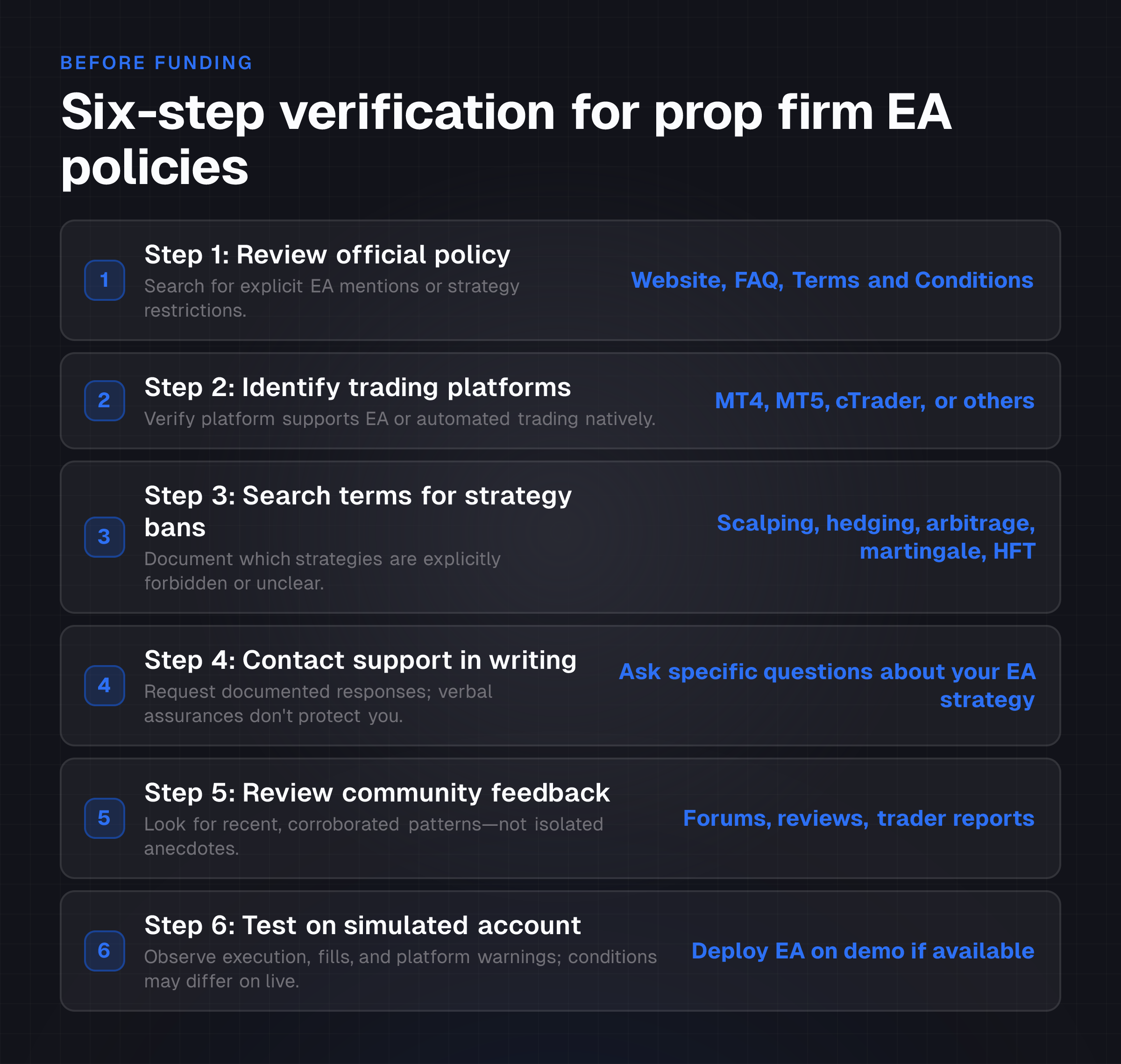
Check the firm's official website, FAQ, and terms directly. Don't rely on forum posts or third-party reviews alone.
Identify which trading platforms the firm offers. MT4 and MT5 natively support EAs; other platforms may not.
Look for specific strategy restrictions, scalping, hedging, arbitrage, martingale, high-frequency trading, in the terms. "Allowed" doesn't mean "unrestricted."
Contact support with written questions. Request documented responses about your specific EA strategy.
Test your EA on a simulated account if available, but understand that demo conditions may not match live funded account policies or execution quality.
Distinguish between evaluation accounts and funded accounts. Policies can differ sharply between them.
What it means: Expert Advisors, platforms, and prop firm constraints
An Expert Advisor is a program that automates trading decisions and order execution on electronic trading platforms. EAs are also called trading robots or automated trading systems. They operate most commonly on MetaTrader 4 or MetaTrader 5, though some trade on cTrader, TradeStation, or other systems.
Proprietary trading firms provide capital to traders in exchange for a share of profits. When a prop firm says it "allows Expert Advisors," it typically means EAs can run on the firm's accounts.
However, this permission often comes with conditions.
Platform compatibility varies widely. MT4 and MT5 are explicitly designed for EA operation. Other platforms may support automated trading through different tools or APIs, or may not support automation at all. If a firm offers only platforms that don't natively support EAs, EA usage is moot regardless of stated policy.
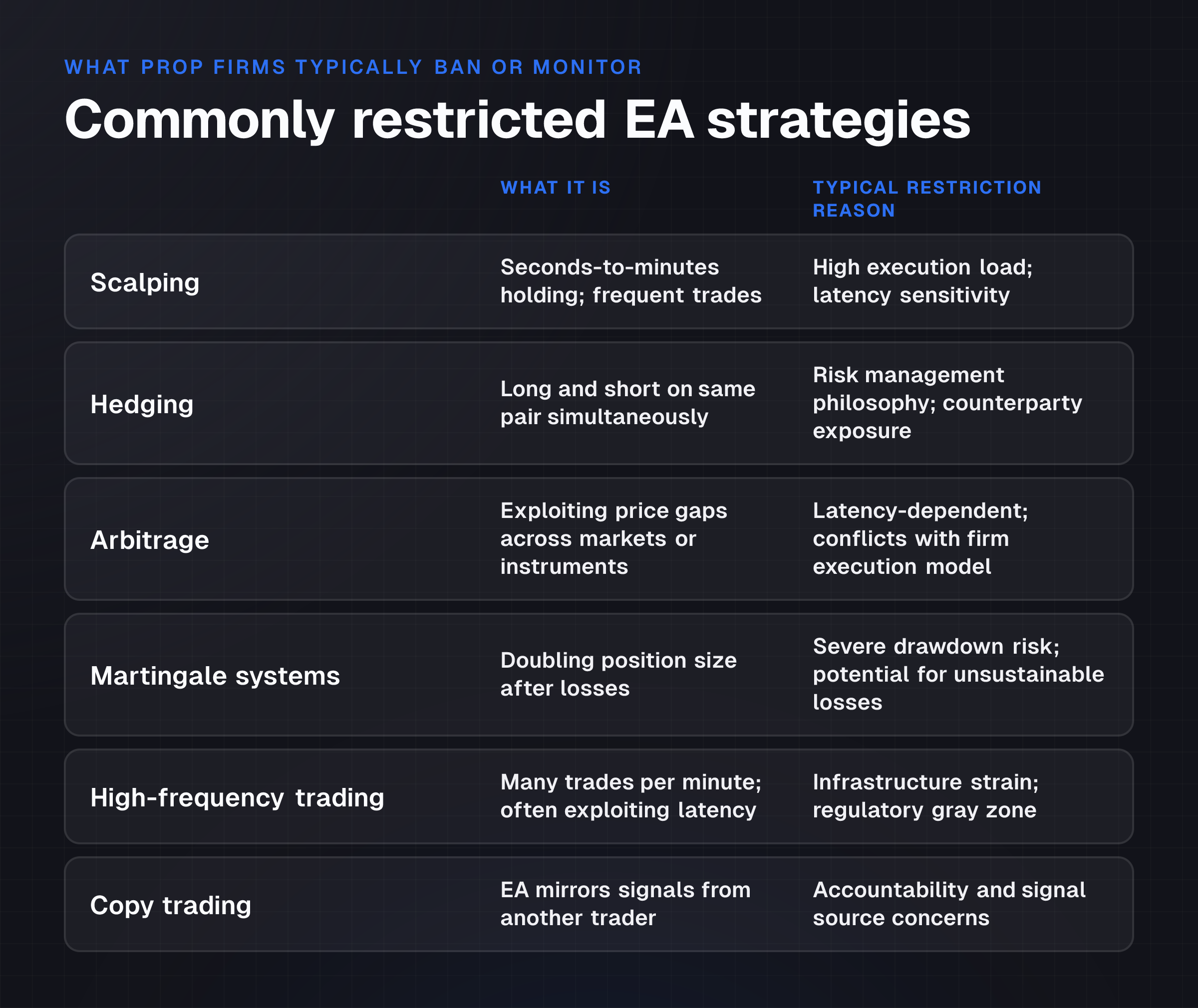
EA restrictions are the catch. A firm might permit EAs in general but ban specific strategies. Common restricted tactics include:
- Scalping: Holding positions for seconds to minutes and trading frequently.
- Hedging: Opening offsetting positions simultaneously, such as long and short on the same pair.
- Arbitrage: Exploiting price differences across markets or instruments.
- Martingale systems: Doubling or increasing position size after losses to recover losses.
- High-frequency trading: Executing many trades per minute, often exploiting latency differences.
- Copy trading: Mirroring another trader's signals via EA.
The distinction between simulated and live funded accounts is critical. Policies, latency, and execution quality can differ sharply. An EA that runs on a demo account may not perform identically on a live funded account, and some firms apply stricter EA rules to live capital.
Why it matters: Account termination, hidden costs, and execution risk
Misunderstanding a firm's EA policy before funding creates three serious risks.
Account termination is the primary risk. Many traders have had funded accounts closed after running EAs that violated unstated or ambiguous restrictions. A firm might allow "EAs" but reserve the right to flag or close accounts running strategies deemed "manipulative" or "unethical" without explicitly defining those terms. This happens quietly. Often without recourse.
Execution and infrastructure misalignment occurs when a trader's EA requires specific latency or execution speed that a firm's servers can't deliver. Some EAs are designed to profit from very fast execution. If a firm's infrastructure introduces unavoidable slippage or latency, the EA becomes unprofitable even if policies allow it. The trader discovers this only after funding.
Policy ambiguity creates ongoing risk. Firms can change policies, enforce them inconsistently, or use vague language in their terms. What was tolerated yesterday might trigger a flag today. "Grey area" strategies like latency arbitrage or high-frequency scalping often fall into this zone, neither explicitly banned nor fully endorsed.
Cost and opportunity loss follow closures. If your account is closed, you lose access to the firm's capital and any profits in the pipeline. Verifying payout rules and withdrawal conditions separately helps, but account closure short-circuits that process entirely.
How it works: A six-step verification process
Step 1: Initial policy review (website and FAQ)
Begin with the firm's official website. Navigate to the FAQ, Terms and Conditions, Trading Rules, Permitted Strategies, or Platform Information sections. Search for explicit mentions of "Expert Advisors," "Automated Trading," "Robots," or "EAs."
What to document:
- Is EA usage explicitly mentioned? Yes, no, or unclear?
- Are EAs explicitly forbidden?
- If mentioned, are there any qualifiers, such as "EAs allowed with prior approval" or "EAs prohibited on news releases"?
If EAs are explicitly forbidden, your inquiry ends. If they're explicitly allowed or not mentioned, proceed to the next step.
Step 2: Identify the trading platforms offered
Check which trading platforms the firm supports. Common platforms include MT4, MT5, cTrader, and TradeStation.
Platform EA support:
- MT4 and MT5: Native support for Expert Advisors. EAs can be written in MQL4 or MQL5.
- cTrader: Supports algorithmic trading via cBots, similar to EAs but using a different language.
- TradeStation: Supports EasyLanguage-based automated strategies.
- Other platforms: Vary widely; some support automation via APIs or plugins, others don't.
If the firm's primary platform doesn't natively support EA functionality, advanced automated trading is generally not possible, even if general EA policies are permissive.
Step 3: Scrutinize the terms for specific strategy restrictions
If EAs are permitted and platforms support them, read the Terms and Conditions and Trading Rules carefully for prohibitions on specific strategies.
Keywords to search for:
- Scalping
- Hedging
- Arbitrage
- Martingale
- High-frequency trading
- Latency arbitrage
- Copy trading
- News trading, sometimes banned or restricted to specific times
Document your findings:
- Which strategies are explicitly banned?
- Which are permitted?
- Which are ambiguous or not mentioned?
Any strategy central to your EA must be explicitly permitted or not explicitly forbidden. Ambiguity warrants clarification.
Step 4: Contact support with specific written questions
If documentation doesn't provide clear answers, contact the firm's customer support through official channels: email, live chat, or a support ticket system.
Ask precise, unambiguous questions:
- "Are Expert Advisors allowed on funded accounts? If yes, are there any restrictions?"
- "Are the following strategies permitted with EAs: [list your specific strategies]?"
- "Are EAs allowed during news events or high-impact economic data releases?"
- "Do EA policies differ between evaluation accounts and funded accounts?"
- "Is EA usage monitored, and what triggers an account review or closure?"
Critical: Request written responses. Verbal assurances are harder to reference later if a dispute arises.
Step 5: Review community feedback and forums
Search independent trading forums, review sites, and online communities for discussions about the firm's EA policies. Look for patterns in trader experiences with account closures, withdrawals, and automated strategy enforcement.
Evaluation criteria:
- Prioritize recent discussions, within the past 6 months.
- Look for recurring themes, not isolated anecdotes.
- Note whether the firm has responded officially to complaints.
- Be cautious of hearsay; corroborate key claims across multiple sources.
This step serves as corroboration, not definitive proof. Use it to flag consistency issues or warning signs in the firm's public reputation.
Step 6: Test on a simulated account (if available)
If the firm offers a free or trial simulated account, deploy your EA and observe its operation over several trades.
What to observe:
- Does the EA execute without technical errors?
- Are fills and slippage within acceptable ranges?
- Does the platform show any alerts or warnings related to EA activity?
- Does latency or order rejection occur?
Important caveat: Successful operation on a demo account doesn't guarantee identical performance or policy allowance on a live funded account. Demo conditions often feature lower latency, no slippage, and unlimited liquidity. Demo policies may also be more permissive than live policies.
Example or scenario: Two traders, two outcomes
Trader A: Thorough verification
Trader A wants to run a scalping EA on a prop firm. She visits the firm's website and finds "EAs are allowed" in the FAQ. She then searches the Terms and Conditions for "scalp" and "scalping." The term doesn't appear. She contacts support and asks: "I use a scalping EA that opens and closes positions within 2-5 minutes. Is this strategy permitted?"
Support responds in writing: "Scalping is not explicitly restricted, but strategies designed to exploit latency or execute unusually high trade frequencies on our platform are monitored and may trigger account review."
Trader A recognizes this as a grey-area warning. She requests clarification: "My EA averages 5 trades per hour on a single pair. Does this constitute 'unusually high frequency'?" Support confirms: "No, 5 trades per hour on one pair is within normal ranges."
Trader A tests the EA on a demo account for two weeks. It performs consistently. She funds the account and runs the EA. It operates without issue and reaches profitability within 30 days.
Trader B: Incomplete verification
Trader B sees that a different firm states "EAs are allowed" and skips further checks. He funds an account and runs a high-frequency EA that executes arbitrage strategies.
The EA runs for three days. On day four, he receives an email: "Account closed due to policy violation: EA strategies inconsistent with firm terms."
He requests an explanation. The firm responds: "Arbitrage and latency-dependent strategies are prohibited." Trader B hadn't searched the terms for "arbitrage" or contacted support. He lost the opportunity to trade and the time invested in setting up the account.
The difference: thorough documentation and written confirmation saved Trader A. Incomplete verification cost Trader B.
Common mistakes or risks: What traders overlook
Misinterpreting "EAs are allowed"
Many firms use broad language like "EAs are allowed" without detailing which strategies, execution frequencies, or hedge types are forbidden. Traders assume blanket permission and later discover restrictions buried three pages into the terms.
Risk: Account closure after deploying a strategy you believed was permitted.
Relying on unofficial information
Forum posts, YouTube comments, and third-party reviews are useful signals but not substitutes for official documentation or direct support confirmation. A trader may have used an EA successfully, but that doesn't guarantee your EA or strategy will be treated the same way.
Risk: Your strategy differs enough to trigger a violation that others avoided.
Neglecting the full Terms and Conditions
Firms often bury critical restrictions in their comprehensive terms. Key phrases like "no hedging," "no arbitrage," or "no scalping" may appear in section 4.7 or appendix B, not the FAQ.
Risk: You miss a prohibition simply because you skimmed rather than searched.
Assuming demo conditions match live conditions
Demo accounts often feature zero slippage, no latency, and unlimited liquidity. A firm may also apply more lenient EA policies to demo accounts to encourage testing.
Live conditions are different. A profitable demo EA may break even or lose on live accounts.
Risk: False confidence based on demo results; real losses on live capital.
Ignoring technical and infrastructure requirements
Some EAs depend on specific latency ranges or execution speeds to be profitable. A firm's servers and data feed may introduce latency or slippage that makes the EA unprofitable, even if policies allow it. The firm may not disclose these technical limitations.
Risk: Your EA is "allowed" but can't perform due to infrastructure constraints.
Not distinguishing between evaluation and funded accounts
Policies can differ sharply between a firm's evaluation phase and funded phase. An EA that runs freely during evaluation may be restricted or monitored once real capital is deployed.
Risk: Surprise restrictions or monitoring after you fund the account.
Operating in grey areas
Strategies like latency arbitrage, high-frequency scalping, and copy trading often fall into ambiguous territory. Firms may discourage them subtly or ban them explicitly without uniformly enforcing the ban.
Don't assume tolerance because a few traders report running similar strategies.
Risk: Inconsistent enforcement means your account could be flagged even if others' haven't been.
Overlooking policy changes
Prop firm policies can shift. A rule allowed six months ago might be restricted today. Traders who don't regularly re-verify their firm's policies risk running an EA that violates new or updated restrictions.
Risk: Account closure due to a policy change you didn't track.
How to choose or what to do next: A decision framework
Before funding an account:
Write down your EA's strategy. Define the exact behavior: typical trade frequency, holding time, position sizes, hedge use, news event behavior, and any latency-dependent logic.
Cross-reference the firm's published rules. Search the Terms and Conditions for keywords matching your strategy. Document what's permitted, banned, and ambiguous.
Contact support with your strategy details. Don't ask generic questions. Describe your EA's actual behavior and ask whether it's permitted.
Request written confirmation. Insist on email or documented responses, not verbal assurances.
Test on a demo if available. Run your EA for at least two weeks on the simulated account to confirm technical compatibility and basic performance.
Verify the firm's payout and withdrawal policies separately. Understanding payout rules ensures you know how to access profits if your EA performs well.
Start with a smaller account or challenge. If the firm offers tiered account sizes or evaluation challenges, begin smaller to test the real live environment with lower risk.
After funding an account:
Monitor account communications and alerts. If the firm flags your EA as unusual or requests information, respond promptly and clearly.
Track your EA's performance, trade frequency, and strategy metrics. Be prepared to demonstrate that your EA operates within the firm's stated guidelines.
Re-read the firm's policies quarterly. Note any updates or changes and verify your strategy remains compliant.
Verify the firm's track record on payouts independently if you reach profitability, to ensure profit withdrawal is straightforward.
Frequently asked questions
What is the difference between "EAs allowed" and "your EA is allowed"?
"EAs allowed" means the firm permits automated trading in principle. "Your EA is allowed" means your specific strategy, execution frequency, and trading logic meet the firm's criteria. A firm might allow EAs broadly but ban specific strategies, scalping or arbitrage, for instance, that your EA uses. Always verify your specific strategy, not just the category.
Can I run the same EA on multiple prop firms simultaneously?
Technically yes, but you must verify each firm's policy independently. Each firm has its own rules, platform, and infrastructure. An EA that complies with Firm A's terms may violate Firm B's restrictions. Don't assume one verification covers all firms. Some firms have exclusivity clauses; check whether trading elsewhere is permitted.
What happens if my account is closed for EA policy violation?
Most firms don't return capital or profits if they close your account for rule violation. You lose access to both your challenge fees and any profits. Some firms offer an appeal process; review the firm's dispute procedures in advance. This is why written confirmation of your EA's compliance is essential, it provides evidence to support an appeal if a closure occurs.
Can I use EAs during news events or high-impact economic releases?
Policies vary widely. Some firms ban all EA activity during major news releases. Others allow it but monitor closely. Many firms restrict or disable hedging specifically during news periods to reduce risk. Always ask this explicitly when verifying your EA strategy, as news trading behavior can be a common trigger for account reviews.
Is a demo EA test enough to confirm my EA is compliant?
No. Demo conditions differ significantly from live funded accounts. Zero slippage, low latency, and unlimited liquidity on demo don't exist on live accounts. Firms may also apply lenient EA policies to demos to encourage testing. A demo test confirms technical compatibility and basic functionality, but compliance and real-world performance require live account experience. Start small on your first live account.
How often should I re-verify my EA policy with a prop firm?
Re-verify at least quarterly, or whenever the firm sends policy updates. Prop firm rules change, and firms sometimes shift enforcement. If your firm sends a newsletter or update notification, review it for EA-related changes. If six or more months have passed since your last verification, contact support for confirmation that your strategy remains compliant.